Showing posts with label Spelling. Show all posts

Tuesday, April 21, 2015

Summer Fit Activity Books Review


I was on the hunt for something that Funny Bunny could work on over the summer between 6th and 7th grade. We don't stop school completely because I like for her to keep her mind sharp but I don't want to overwhelm her with work.

That's when I stumbled across Summer Fit.  Summer Fit Workbooks were written by teachers to help prepare students academically, physically, and socially for the next grade level.

Summer Fit Activities engage children in the following areas:

Academics: reading, writing, math, language arts, science, geography, & tech
Fitness: exercise, active play, healthy eating, and nutrition
Core Values: honesty, self-discipline, and friendship

The Summer Fit is a series of nine workbooks:  P-K, 1st-2nd, 2nd-3rd, 3rd-4th, 4th-5th, 5th-6th, 6th-7th, and 7th-8th

Each book contains:

* A parent introduction
* 10 weekly units that start with an overview and cover the subjects above
* 10 pages for each unit so only 2 pages per day need to be completed
* A weekly role model, like Jackie Robinson, and core values in each unit
* Extension activities

I received two workbooks to review - Summer Fit 2-3 and 6-7.


My Thoughts:  As I mentioned above, both are laid out in the exact same format, the only difference is the material. The material is different each day, which is nice and will hopefully keep the child from getting bored. In flipping through the 6-7 grade book, there are things that will be review for Funny Bunny but there are definitely new concepts.

Below you can see a few samples from both books.

2nd-3rd

2nd-3rd

6th-7th

6th-7th

Find Out More:  You can find out more online at Summer Fit Learning and on their Facebook Page. Workbooks can be purchased on Amazon for between just $9 and $12.


Don't miss a thing! Subscribe to Our Homeschool Reviews and get our articles right to your inbox!

©2010-2015 Our Homeschool Reviews. All rights reserved. All text, photographs, artwork, and other content may not be reproduced or transmitted in any form without the written consent of the author. http://ourhomeschoolreviews.blogspot.com/

Wednesday, October 30, 2013

VocabularySpellingCity Review

 photo VSCLogo300x300_zpsa95c604b.jpg

We seem to tackle spelling a little different each year.  In the past we have used leveled spelling lists and this year we are mainly using dictation, but for the past couple years we have also used VocabularySpellingCity.  

VocabularySpellingCity is an award winning website for K-12 that focuses on Vocabulary, Spelling, Writing, and Language Arts.  We received their Premium Membership for this review.

Features Include: 

* Over 50,000 words and 60,000 customizable sentences and definitions
* A real person who says each word and sentence
* Home pages for teachers and parents to save lists
* Teacher Training Videos
* Printable handwriting worksheets
* Teaching resources with lists and lesson plans
* Games to play online or to print
* A forum and newsletters


The BEST part about VocabularySpellingCity is that you can use the basic features of their site for FREE!! You simply start by entering your words.


Of course, becoming a premium member has its benefits, which you can see below.


I received a one-year Premium Membership and here is how we have been using it.

Funny Bunny is an excellent speller, so instead of using a spelling and vocabulary list for her grade {which I knew she would have no trouble with} I have made my own lists using her science and history vocabulary words. I cannot begin to tell you how this has helped her, and it is so much more fun for her than writing definitions or using flash cards.

Once I have added a student, I can either find a pre-made list or create my own. There are thousands of ready-to-use word lists by subject and/or grade level. Here is just a peek at what you can find.


The Premium Membership lets me keep track of her progress and I can even organize all of her word lists by type. For instance, I have all science word lists in the science folder.


Below you can see that I can view her grades and assignments that she has completed and not yet done. I can also print off all her grades for my records.


My Thoughts: We are loving VocabularySpellingCity! I like that I can use it how I want. I can use their lists, make my own, make short lists, long lists, and add as few or as many activities to each assignment. It is really up to me. It's great that it keeps track of everything and as a reward Funny Bunny can play spelling or vocabulary games. 

Edited on 3-11-14:  VocabularySpellingCity is still our favorite spelling and vocabulary program!

Thoughts of a 10-Year Old: I like VocabularySpellingCity and all of its activities.  The activities are all split into sections based on what their purpose is. 

1. Teach. The teach category consists of two activities: Spelling TeachMe and FlashCards. (FlashCards is for premium members only, so if you aren't a premium member, you cannot use this activity.)

2. Spelling. There are a lot of games in the Spelling category, like HangMouse, Missing Letter, and Test-N-Teach. These are to go over the spelling before the a test.

3. Writing. The only activities in writing are premium - Sentence Writing Practice and Paragraph Writing Practice. These are very similar, and I usually use them as games. The object is to write sentences or paragraphs with all of the vocabulary words. 

4. Vocabulary. Once again, none of these activities can be used without premium membership. The Vocabulary activities include: MatchIt Definitions, WhichWord Sentences, and my favorite of the WHOLE game, Word-o-Rama!! This funny penguin with the toupee talks you through the game show as you answer questions. If you get the answer correct, the penguin says quirky things like, "Thaaaaaat's right!" or "Points for you!"

5. Language Arts. This interesting category has a few activities like Read-A-Word and Alphabetize, and some premium activities are Parts of Speech and Crossword. These help children with their language arts skills.

6. Tests. It's what all of the fun stuff leads up to...the dreaded...spelling and vocabulary tests! Actually, these tests aren't so bad. There's no pressure or time limit, and SpellingTestMe and VocabularyTestMe are not so bad.

And the best part?  The games, of course!  After you've completed an assignment, you can play a game!

I really enjoy VocabularySpelling City and hope you will, too!     

 photo wordorama_zps693e47d4.jpg

Find Out More: You can find out more online at VocabularySpellingCity. The cost of their Premium Membership is just $29.99 a year and is for up to five students. Up to 25 students in a classroom or co-op can use it for just $49.99. They also have a free app for the iPhone, iPad, or iPod Touch.

My Crewmates are also talking about VocabularySpellingCity, so you can check out what they think about it HERE.



©2010-2013 Our Homeschool Reviews. All rights reserved. All text, photographs, artwork, and other content may not be reproduced or transmitted in any form without the written consent of the author. http://ourhomeschoolreviews.blogspot.com/

Monday, October 29, 2012

Samson's Classroom Review

Photobucket

Samson's Classroom is software for young readers.  Perfect for grades K-5, Samson's Classroom is an online series that helps students become better readers. Students can play engaging games that focus on 3 core building blocks; sight words, spelling, and reading comprehension. 

Photobucket

Sight Words with Samson

Sight Words with Samson is great for beginning readers and will help them master the 224 most commonly used words.  For each word list, there are 5 steps to complete:

1. Study
2. Missing Letters
3. Letter Scramble
4. Spell Words
5. Missing Words


Photobucket

Spelling with Samson

Spelling with Samson contains over 5,000 words you can choose in preset word lists or you can create your own.  Word lists can be selected by grade, topic, word family, or by sight words.  Once a list is selected, the child will then complete 4 steps:

1. Study Zone
2. Missing Letters Karate Chop Game
3. Spelling Scramble with Terrence the Tarantula
4. Crunch Time with Wally the Walrus

Photobucket

Reading with Samson

Reading with Samson focuses on comprehension and includes 4 levels.  Once they read the passages, {and they must read them, there is no audio}, they have several questions to answer.  When the questions are answered, they get to help Samson swing the hammer at the carnival to earn points. 

Photobucket

Photobucket

My Thoughts:  Funny Bunny is 9 years old so she mainly focused on Spelling with Samson and Reading with Samson.

In Spelling with Samson, she really like the Missing Letters Karate Chop Game and Crunch Time with Wally the Walrus.  Spelling Scramble with Terrence the Tarantula has never worked right for us so she was not able to play it.  Funny Bunny's only complaint with Spelling with Samson was that there were only a couple games to play.  Even though she liked the two she played, she got a little bored after a while because she wanted more of a variety.

I had one problem with it when I created my own word list.  I made a list of 25 words from a pretty popular spelling curriculum.  Of the 25 I entered, only 17 were in their database and I was not able to use the other 8 {which I think were pretty basic words} until my request to have them added was approved.  It is my understanding from the vendor that it could take up to 6 weeks for them to add requested words to the system because of the process they have to go through.  I prefer making my own list, so that time frame just won't work for us.  For those who like the preset lists though, this is a great program!

We both really liked Reading with Samson and I thought the focus on comprehension was excellent!  If you miss a question, the paragraph where the answer is located is highlighted, so you can try to answer again.  I thought the progression of difficulty within the levels was good.

Find Out More:  You can find out more online at Samson's Classroom.  It is just $30 per year for one user and $50 per year for a family.  There are also prices for a classroom, grade level, and entire school, which you can read more about on their pricing page.  If you would like to try it our before purchasing, you can play free demo versions of the games without setting up an account.

My Crewmates are also talking about Samson's Classroom, so you can check out what they think about it HERE.

Photobucket

Disclaimer:  This product was given to Our Homeschool Reviews for free for review purposes, and I do not have to return the product to the vendor.  I have received no compensation from it and all opinions and experiences within this review are my own.


Wednesday, August 15, 2012

Vocabulary Spelling City Review

Photobucket

Do you want to hear about my new favorite online learning site?  It's called Vocabulary Spelling City

Vocabulary Spelling City is an award winning website for K-12 that focuses on Vocabulary, Spelling, Writing, Parts of Speech, Handwriting, and Alphabetical Order. 

Features:

*  Over 42,000 words with customizable sentences and definitions
*  A real person who says each word and sentence
*  Free home pages for teachers and parents to save lists
*  Teacher Training Videos
*  Free printable handwriting worksheets
*  Free teaching resources with lists and lesson plans
*  Twenty-five games to play online or to print
*  A free forum and newsletters


The BEST part about Vocabulary Spelling City is that you can use the basic features of their site for FREE!!  You simply start by entering your words.


Of course, becoming a premium member has its benefits, which you can see below.


I received a one-year Premium Membership and here is how we have been using it.

Funny Bunny is an excellent speller, so instead of using a spelling and vocabulary list for her grade {which I knew she would have no trouble with} I am making my own lists using her science, history, and math vocabulary words.  I cannot begin to tell you how this has helped her, and it is so much more fun for her than writing definitions or using flash cards.

Once I have added a student, I can either find a pre-made list or create my own.  There are thousands of ready-to-use word lists by subject and/or grade level.  Here is just a peek at what you can find.


The Premium Membership lets me keep track of her progress and I can even organize all of her word lists by type.  For instance, I have all science word lists in the science folder. 

Below you can see that I can view her grades and assignments that she has completed and not yet done.  I can also print off all her grade for my records.


I can also view each activity I selected for a given assignment and its status and score.


My Thoughts:  We are loving Vocabulary Spelling City!  I like that I can use it how I want.  I can use their lists, make my own, make short lists, long lists, and add as few or as many activities to each assignment.  It is really up to me.  It's great that it keeps track of everything and as a reward Funny Bunny can play spelling or vocabulary games. 

Thoughts of a 9-Year Old:  I like Vocabulary Spelling City because it's helping me learn my vocabulary words, their definitions, and how to spell them.  My favorite part of the program is the games.  I would strongly recommend Word -O-Rama.  I also liked: Letter Fall, Practice Paragraph Writing and Practice Sentence Writing (because you get to write whatever you want as long as you include the words).  My mom adds words from our science book and then on my science quiz in school, I got them right!  I really enjoy it.

Find Out More:  You can find out more online at Vocabulary Spelling City.  The cost of their Premium Membership is just $29.99 a year and is for up to five students.  Up to 25 students in a classroom or co-op can use it for just $49.99.  They also have a free app for the iPhone, iPad, or iPod Touch.

My Crewmates are also talking about Vocabulary Spelling City, so you can check out what they think about it HERE.

Photobucket

Disclaimer:  This product was given to Our Homeschool Reviews for free for review purposes, and I do not have to return the product to the vendor.  I have received no compensation from it and all opinions and experiences within this review are my own.

Friday, May 20, 2011

Wordy Qwerty by Talking Fingers Review


Back in October I had the opportunity to review the Read, Write, and Type Learning System by Talking Fingers.  My daughter absolutely loved it and her typing improved quite a bit.  She completed the whole program and still goes back to replay it from time to time.

Now I have the pleasure of telling you about another program by Talking Fingers called Wordy Qwerty.   Wordy Qwerty is the sequel to Read, Write, and Type.  It consists of 20 consecutive lessons that teach children how words are constructed, thereby improving their reading and spelling.  

Each lesson includes a new spelling rule that you can find here and the lessons are broken down into six activities which include the following:

1. Patterns:  Here you have to make two lists of words by typing the names of pictures and then sorting the words by a given characteristic.  If you choose wrong, you are given help by Qwerty and Midi.


2. Karaoke:  There is a catchy song for each of the 20 spelling rules.  This is my favorite part of the program!  What better way to help children remember rules then to put them to music.  Children are also encouraged to sing along, and I bet they will, mine did!  :)

3. Recycler: Children learn different vowel combinations that can make the long vowel sound, like the words "week" and "weak".  They watch the Recycler as it changes the first letter of two rhyming words.  Then they have to decide where the word goes, and if it is even a word at all.

4. Pop-a-Word: Here you have to find words in a four word phrase as each word quickly appears in a cluster of balloons. As you click on the correct balloons, they pop. The faster you find the correct words, the more points you make.  This can be challenging, and you have to pay close attention and be careful.

5. Write Stories: In these rhymes, children hear and see the first line, and have to type out the second line after it is dictated. They can see and hear the dictated line as often as they need, but get more points if they remember the sentence and try to spell the words correctly.  I personally think this is the most challenging activity. 

6. Read Stories: These written stories are missing several words.  You have to fill in the blanks with one of three given words.  Missing words will be ones that use the spelling rule you just learned.


Here you can see the complete Scope and Sequence.  

My Thoughts:  I really love Wordy Qwerty and am glad we got the opportunity to try it out.  I think the combination of all the fun activities is what makes this product great.  Kids don't even realize they are learning.  My daughter loves this program and asks to play it in her free time (which is unusual for anything that has to do with school).

That being said, she is a natural speller and this program seems pretty easy for her.  As parents, we can set the pass rate to the percentage we would like.  I normally set it to 80% if I have the option.  With Wordy Qwerty, if your child falls below your set percentage, they will be sent back only one time.  After that they more forward in order to keep kids moving through the program without getting too discouraged.  So as parents, it will be important to watch your child's percentage results and have them repeat any lesson they need help with.

Thoughts of an 8-Year Old:  I like Wordy Qwerty because it's fun. My favorite games are the "Pop-a-Word" and "Read Stories". My least favorite is Karaoke.  I also like the Orb Music Machine, which is where you get orbs for Mitty. LOVE IT!

Find Out More:  You can find out more about Wordy Qwerty and other products on the website, Talking Fingers.  The Online Home Edition for one user sells for $25, two users for $40 and it goes up from there, up to five users.  All home online subscriptions are for five years.  The CD Home Edition sells for $35.  Unfortunately it is not compatible with Windows 7 or Mac 10.6.  You can also purchase all those catchy songs on CD or from iTunes.  Lastly, if you want to try Wordy Qwerty out first, you can get Lesson 1 FREE.  You can also save 20% off your order by following that link. 

My Crewmates are also reviewing Word Qwerty, so you can check out what they think HERE.


Disclosure: This product was given to Our Homeschool Reviews for free for review purposes, and I do not have to return the product to the vendor. I have received no compensation from it and all opinions and experiences within this review are my own.

Friday, March 25, 2011

BigIQKids Review

 
I have to tell you about a very neat educational website that I am loving!  Why?  Well, because they have fun programs for spelling, math, vocabulary, AND the U.S. states...all in one place. 

BigIQKids basically turns your computer into an online learning academy, where your children can log on to complete daily, fun and interactive lessons. 

One wonderful feature of each one of these programs is that they all can be used for FREE!  Now you can purchase a premium membership for each one, and there are several advantages of paying for a premium membership:

* You can monitor the progress of your child and advance them only when mastery of the subject material has been achieved.

* Their progress is tracked and saved, problem areas are identified, and these are reported to the parents via email.

* They are offered customized "buddies", full game page access, and the ability to save game coins and game high scores.

* The premium programs also have very limited advertisements and no ads during the lessons.


Spelling Program:  Each spelling lesson has five steps:  Intro Lesson, Robot Practice, Spelling Bee or Word Scramble, Pop Quiz, and Spelling Test.  Lessons can be modified by selecting the appropriate grade, choosing one of many preset lists of words (over 40,000), or by creating your own list of words.  I love how each lesson can be modified!!


Math:  Math lessons can also be modified.  You choose problems in addition, subtraction, multiplication, and division, and they can be customized to use any number or number of digits you would like.  You can then choose the daily number of problems to give your child and whether or not you want a clock visible during the lesson.


Vocabulary:  This is similar to spelling in that it has five steps:  Intro Lesson, Matching, Definition Lesson, Your Pick, and Test.  Again, the lessons can be modified by selecting the appropriate grade, choosing one of many preset lists of words, or by creating your own list of words. 


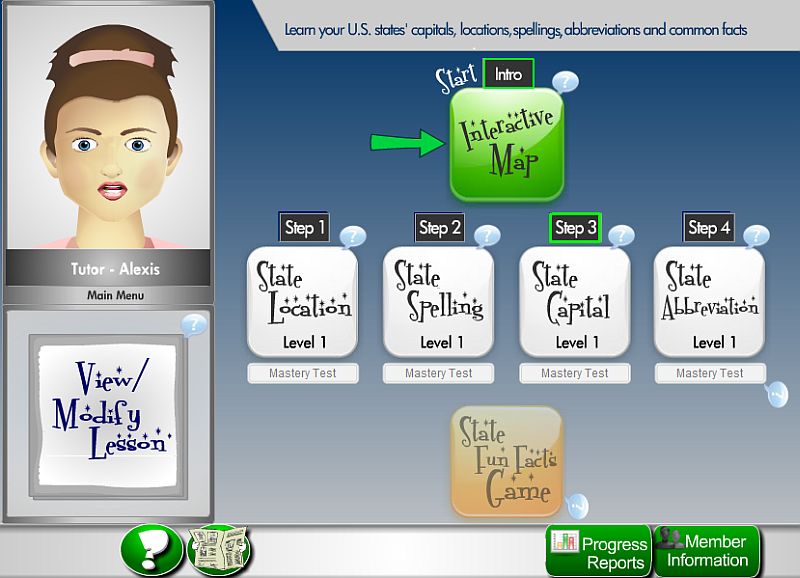
U.S. States:  This is my daughter's favorite section.  You start with an Interactive Map where you can choose the state you would like to learn about (once you have picked a state, it will be checked off next time you view the map).  You are given several facts about the state and then a comprehension question before you move on. The next four steps include: State Location, State Spelling, State Capitols, and State Abbreviation. 


There is also a FREE Spelling Bee and Spelling Game, FREE Vocabulary Game, FREE Vowel Program, and an E-book Series.


Another great feature of the programs is that when you complete each step you get a coin to use to play a game.  The advantage with the Premium Membership is that you can save them for later, instead of using them right away.

My Thoughts:  As I said before, I love BigIQKids.  We have used the free programs in the past, mainly the Spelling Bee.  They offer a wide variety and I like how each program can be customized to your child and their level.  I also like how you can save coins with the premium membership so they can wait to play the games until a later time. 

Thoughts of a 7-Year Old:  I like BigIQKids' U.S. States because it's fun and simple. Every time you complete something, you earn a game coin. A game coin lets you play on the Game Menu. The other programs are good too, but my favorite is U.S. States!     

Find Out More:  All programs on BigIQKids are FREE but you have the option to purchase Premium Memberships.  Prices start at $7.99 a month for the individual programs and $19.99 for the package of four programs and go up from there.  You can see more about pricing here

My Crewmates are also reviewing BigIQKids, so you can check out what they think HERE.


Disclosure: This product was given to Our Homeschool Reviews for free for review purposes, and I do not have to return the product to the vendor. I have received no compensation from it and all opinions and experiences within this review are my own.