Showing posts with label Typing. Show all posts

Wednesday, November 9, 2011

Keyboard Town PALS Review

Photobucket

Keyboard Town PALS is a Learn to Type program for kids.  It takes children from typing with only one finger to typing with both hands in just one hour.

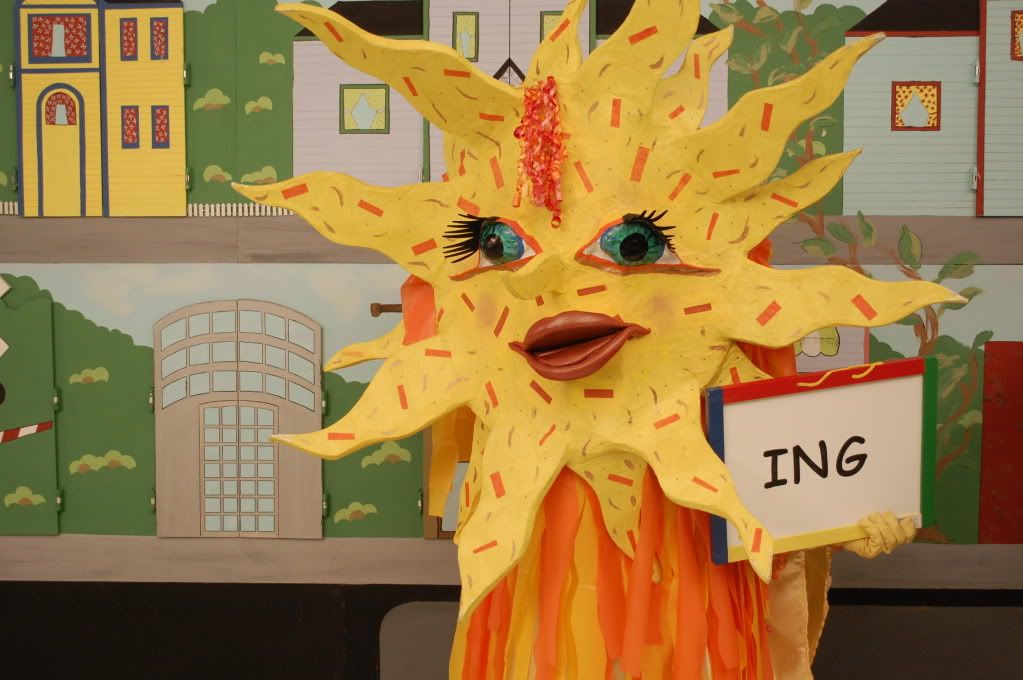
Keyboard Town PALS is different from other typing programs which focus on speed and accuracy.  Those timed drills can sometimes be stressful for children.  In this program, puppets use music, humor and association to teach the location of 30 letters and symbols in an hour, in a manner that is fun and relaxed for children.
Photobucket

How are they different:
  • Children proceed at their own pace
  • The puppets, humor and music are very entertaining
  • Children easily recall the storyline
  • Children will want to view it again and again
  • No fear of making mistakes
  • No racing against the clock
  • No testing
  • No scoring
  • No anxiety
Other features include:
  • The de-activation of the delete and backspace functions as to not dwell on mistakes.
  • The ability to shorten or lengthen the lessons, which is especially helpful to children with learning differences.
  • The ability to change fonts and background screen colors.
Below you can take a peek at Lesson 1 


My Thoughts:  I like the concept of Keyboard Town PALS but it seemed to me that it is a better fit for younger children rather than older (at least in our case).  The puppets are cute and my daughter seemed to like them and their funny stories, but she got bored with the program after a while. 

The space where your child types their letters is not interactive with the program at all.  So technically, they could be typing whatever they want and the program would not know.  I can see why they designed it like this...it's less stressful on the child, but I just don't think it was challenging enough for Funny Bunny.

Thoughts of an 8-Year Old:  Keyboard Town PALS is fun and boring. The characters are silly but you have to sit and do: "Q. Type Q. Now type Q.  Type Q again. Two more to go!" I think it's also bad because if it says type "G" you can type "suisuisuisuisui" and it doesn't care! So it thinks you're typing "F" but you're typing "suisuisuisuisui" instead. Plus the backspace and delete buttons are unusable. So it's more of a program for beginners. But it's always fun to see what Keyboard Town PAL will be next!

Find Out More:  You can find out more at Keyboard Town PALS.  Keyboard Town PALS sells for $30 and available in English, Spanish or French.  It works with a PC or MAC and can come on a CD or is web based with a broadband connection.  There are also additional bundles you can purchase here.

My Crewmates are also reviewing Keyboard Town PALS, so you can check out what they think HERE.

Photobucket

Disclosure:  This product was given to Our Homeschool Reviews for free for review purposes, and I do not have to return the products to the vendor.  I have received no compensation from it and all opinions and experiences within this review are my own. 

Monday, October 11, 2010

Read, Write & Type by Talking Fingers

I was just telling a friend the other day that I think it was time I looked into buying our daughter some sort of typing software.  She uses the computer several times a week to write stories, play games, and email her friends.  The main problem she has though, is that she only uses one finger to type, her other hand is usually resting under her chin, holding her head up...lol!

Literally, within weeks of me making that statement, I received notice that I would be reviewing Read, Write & Type by Talking Fingers!  I was initially very excited, but when I saw that it was for ages K-3, I became a little worried.  Our daughter has been able to read and write now for many years now.  I just wanted the part that teaches her how to type.  Would it be a good fit for us?

Well, my daughter LOVES and so do I!  Here is how it works.  The child hears the individual sound of the letter and associates each sound with a letter and fingerstroke on the keyboard.  It uses a multi-sensory and motor approach, which helps children who have different learning styles.  The child gets auditory and visual feedback to correct their answers and their progress is then tracked by the program, which suggests activities to help them in problem areas. 

And the best part is, all this learning takes places with colorful characters who inhabit a fascinating world, filled with music and animation.  A lively gang of storytellers live in two houses that look like the two halves of a keyboard.  A very mischievous computer virus called Vexor tries to steal the letters and prevent the storytellers from writing down their stories (Vexor is my daughter's favorite character)!  Two Helping Hands, Lefty and Rightway, help children foil Vexor through 40 exciting levels, building hundreds of animated sentences and stories as they go.  Children are rewarded with certificates of advancement after every four letters.  For a more detailed explanation, you can take a Product Tour, which takes you through just about every activity. 


 My Thoughts: I really like this product and my daughter loves to use it.  The storyline and characters are a great way to get children to learn to read, write and type.  It is very easy to use and although our daughter already knows how to read and write, the story is engaging enough for her that she wants to keep going to see what will happen.  

I think our daughter is at a good age to learn to type correctly because of her hand size.  That being said, I can see how this may be harder for smaller children whose hands are not as big.  They may get tired more easily or may not be able to stretch to reach the letters as well.  For us though, it is a perfect fit!  We will continue to use this product! 

Thoughts of a 7-Year Old: Without Vexor, it wouldn't be half as exciting as it is! It has a mixture of phonics, picture reading, and typing, along with extra details such as capital letters, periods, etc. Each letter has a character, and they do funny things. My favorite character is Hug the Hamster (see picture above). As you can see in the picture, your child will have to write H words (with no time limit). Three strikes, and Vexor will huff, puff, and blow you out!  

Find Out More: Read, Write & Type by Talking Fingers online pricing varies depending on the number of users, but it starts at $35 for one student.  You can find more information on pricing HERE.  With the online version you get a FIVE-year license but for the home version, it is yours to keep, and for multiple users, for only $79. 

My Crewmates are also reviewing Read, Write & Type, so you can check out what they think HERE.


Disclosure: This product was given to Our Homeschool Reviews for free for review purposes, and I do not have to return the product to the vendor. I have received no compensation from it and all opinions and experiences within this review are my own.